
Verification confirms that you complete all parts of the Higg FEM accurately. Your self-assessment gains the credibility and accuracy you need to share it publicly.
A Cascale-approved verifier conducts the verification of your Higg FEM self-assessment. The verifying body selects and hires a specific verifier to review your facility site. The verifier is the only person responsible for confirming that your assessment is accurate.
How to Prepare for and Complete Higg FEM Verification
NoteContact the verifying body directly to confirm the timing and terms of verification. This conversation happens outside of the Worldly platform. You arrange these details directly with your verifier.
- View the list of Higg FEM Verifiers HERE.
- You must fully complete your Higg FEM self-assessment (reach 100% completion) and post it before verification can begin.
- In the top navigation, click Supply Chain > Higg FEM.
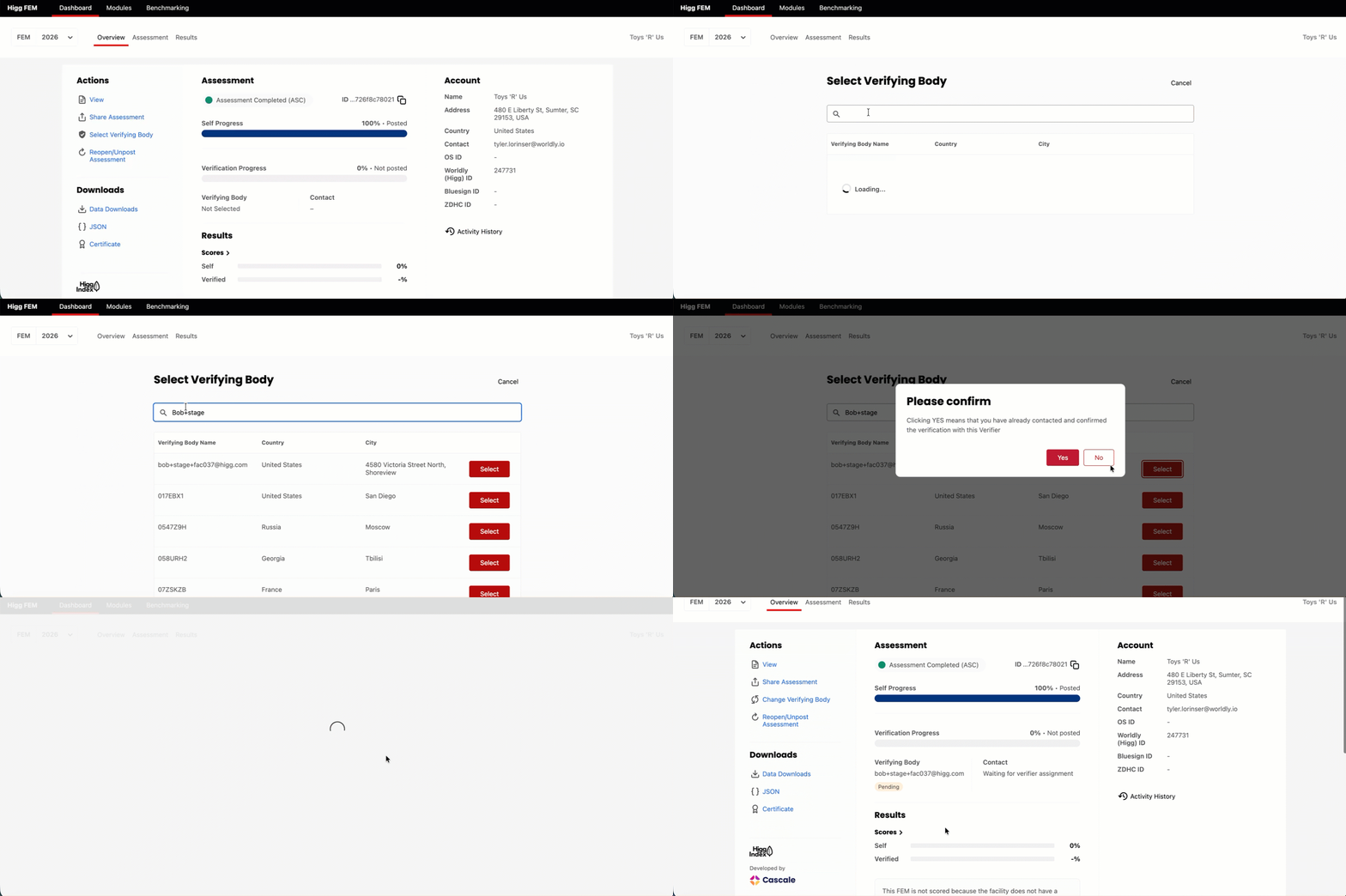
- On the Overview tab, under Actions, click Select Verifying Body.
- Use the search bar to locate your verifying body.
- Click Select.
- A pop-up box appears.
- Click Yes to confirm.
- The system redirects you to the Higg FEM Dashboard. The verifying body receives a notification. Once they accept your request, they assign a specific verifier to conduct the verification. The verifier contacts you directly with further instructions.
- You can see the verifying body name and the status of your request on the dashboard.
- Under Contact, the dashboard shows Waiting for verifier assignment until the verifying body assigns the verifier point of contact.
- The status changes to Accepted once the verifying body accepts your request.
- The Contact field changes to show the verifier’s name once the verifying body assigns them.
- You can track your verification progress using the status loading bar on the dashboard.
- Once the verifying body submits the verification and assessment to VRC, you review the verification. You can choose one of these actions:
- Request Edit - You request edits to the assessment.
- Review Verification - You review the assessment’s verification results.
- Dispute Verification - You dispute information in the assessment’s verification.
- Finalize Verified Assessment - The assessment is finalized but not posted. You can post it later.
- Finalize and Post Assessment - The assessment is finalized and posted immediately.
Review the following resources to learn more about the Higg FEM Verification Program: