Table of Contents
- FDM Validation Overview
- Who can perform FDM validation?
- FDM Validation versus FEM Verification
- FDM Audit Types and Frequency
- FDM Validation Process for Brands
- Contacting approved FDM validation bodies
- Conducting Validation as an Approved Validation Body
- Rolling Forward Validation Body Selections
FDM Validation Overview
As regulations continue to require more accurate data and reporting requirements demand more transparent results, it is important for companies to have confidence in the data they disclose. Worldly recommends FDM data validation as a way to assure the accuracy of the information brands are collecting, so they can spot any errors far in advance, and reduce the risk of reporting inaccurate information.
Who can perform FDM validation?
Both brands and facilities may hire any Worldly-approved assurance provider to validate FDM data. Brands can either pay for the facility to complete validation or they can have their facility pay for validation themselves. Click here to view the list of Worldly-approved Facility Data Manager validation bodies.
These organizations may design validation programs cooperatively with brand clients and customize validation program characteristics such as the frequency of remote/onsite audits, required auditor level of qualification, and pricing.
FDM Validation versus FEM Verification
It is important to note the difference between FEM verification and FDM validation.
- FEM Verification: Typically a governed process, where many assurance providers are subject to accreditation-like standards created by a verification program manager/standards owner. In the case of FEM, Cascale and Sumerra create a verification protocol that the assurance providers must adhere to in order to maintain a common approach and standard across all providers and clients.
- FDM validation: Not governed by a third-party program or standards owner. It is subject to individual agreements between the brand and the assurance provider, providing flexibility on program design to meet the brand's unique needs – such as remote vs. on-site audits, audit frequency and level, and ultimately cost.
FDM Audit Types and Frequency
Because facilities upload their monthly data into the FDM, it may be necessary to validate this data more frequently than once a year. Since FDM primarily focuses on quantitative data from a select number of key environmental impact categories, the amount of data that needs to be reviewed is less than Higg FEM.
Onsite Validation
Validators visit the facility premises and validate the sources, scope, and documentation that reflect what the facility submitted into FDM. Onsite FDM validation may be appropriate on a facility’s first month of FDM data submission and annually thereafter. Onsite validations may be scheduled at the same time as a facility’s Higg FEM verification to reduce cost.
Remote Validation
For remote validation, the validator remotely reviews the quantitative data a facility has uploaded in FDM along with the facility’s evidentiary documentation. Remote validation can be leveraged as a complement to onsite validation. It is not a requirement but Worldly recommends that facilities have one annual onsite validation with remote validation done quarterly or semi-annually.
FDM Validation Process for Brands
As sustainability regulations emerge globally, brands will need validated primary data from their supply chains to disclose and comply with confidence. Validated FDM data will be a critical asset in brands’ sustainability target tracking, performance improvement, and compliance toolkit.
Contacting approved FDM Validation Bodies
The first step for brands interested in FDM validation is finding a Worldly-approved validation body.
- The list of Worldly approved validation bodies is found here. Brands should contact their preferred validation body to discuss program requirements and pricing.
- Since FDM validation is guided by agreements between brands and Worldly-approved third-party assurance providers, brands have the flexibility to organize and manage their validation programs in various ways.
- Keep in mind that if your facilities are completing both FDM and FEM, it may be beneficial to use the same assurance provider to increase efficiency and reduce costs.
If you would like to work with an assurance provider that is not yet Worldly-approved, please direct your assurance provider to email vbsubscriptions@worldly.io. A Worldly representative can walk them through eligibility requirements, access models, and the onboarding process.
Once you agree on your requirements with a validation body, you should inform your facilities of the validation requirements and validation body selected. The validation body will begin the validation process with the facilities (e.g., scheduling, orientation, etc.) as arranged outside of the Worldly platform or when a facility selects them as their validation body on the platform.
Viewing Validation Progress
While brands do not need to take action on the Worldly platform to initiate validation, they can see whether or not validation of shared FDM data has occurred.
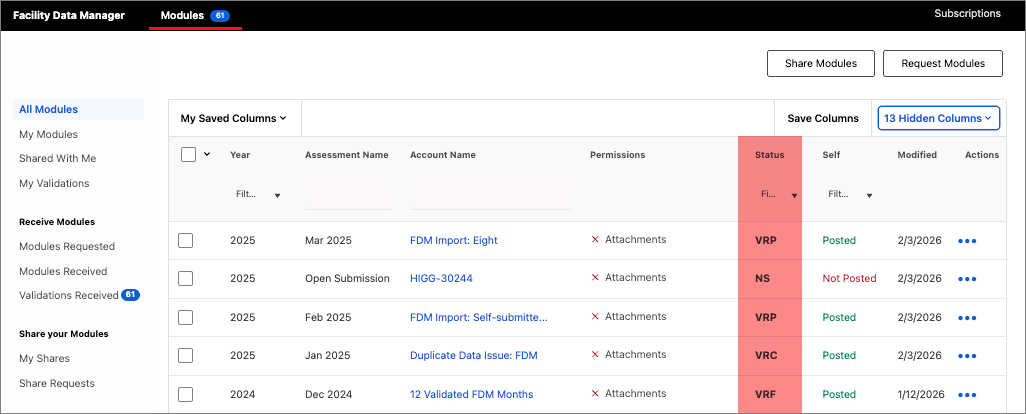
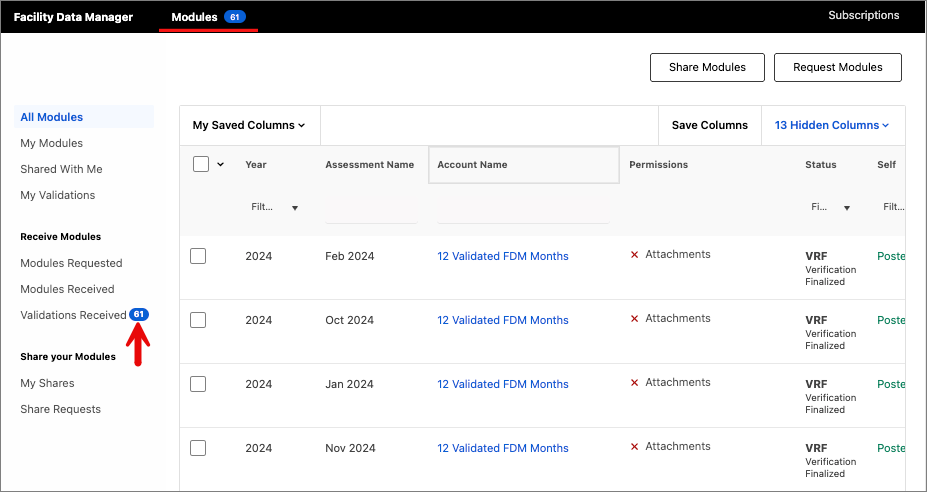
Validation status can be observed in the FDM Modules tab under the Status column.
- When validation is in progress, the status will show VRP.
- When validation is complete the status will show as VRC.
- Once a facility has accepted and finalized validation, the status will then change to VRF.
- Learn more about Assessment Status Abbreviations here.
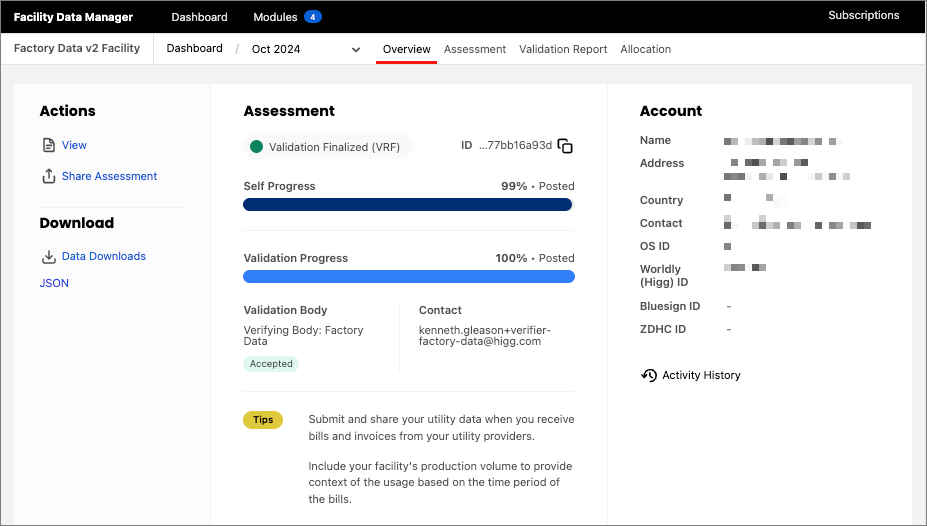
View more details of the validation status by clicking into an individual facility's FDM module dashboard. Here you can view the facility information, validator’s details, the assessment, and the validation report. From the overview page you have the option to also download a CSV of FDM data.
FDM Validation Process for Facilities
Validating FDM data allows facilities to demonstrate to business partners and potential buyers that their data has been assured by an independent third party.
As new supply chain and due diligence regulations emerge, having trusted data will become increasingly important. Additionally, facilities can see the benefits of their impact improvements sooner and report these to stakeholders shortly after implementation.
Brands will usually contact facilities directly, outside of the Worldly platform, to inform them of validation requirements. However, if a facility wishes to proactively validate its FDM data, a list of Worldly-approved FDM validation bodies is available here.
Validation Process
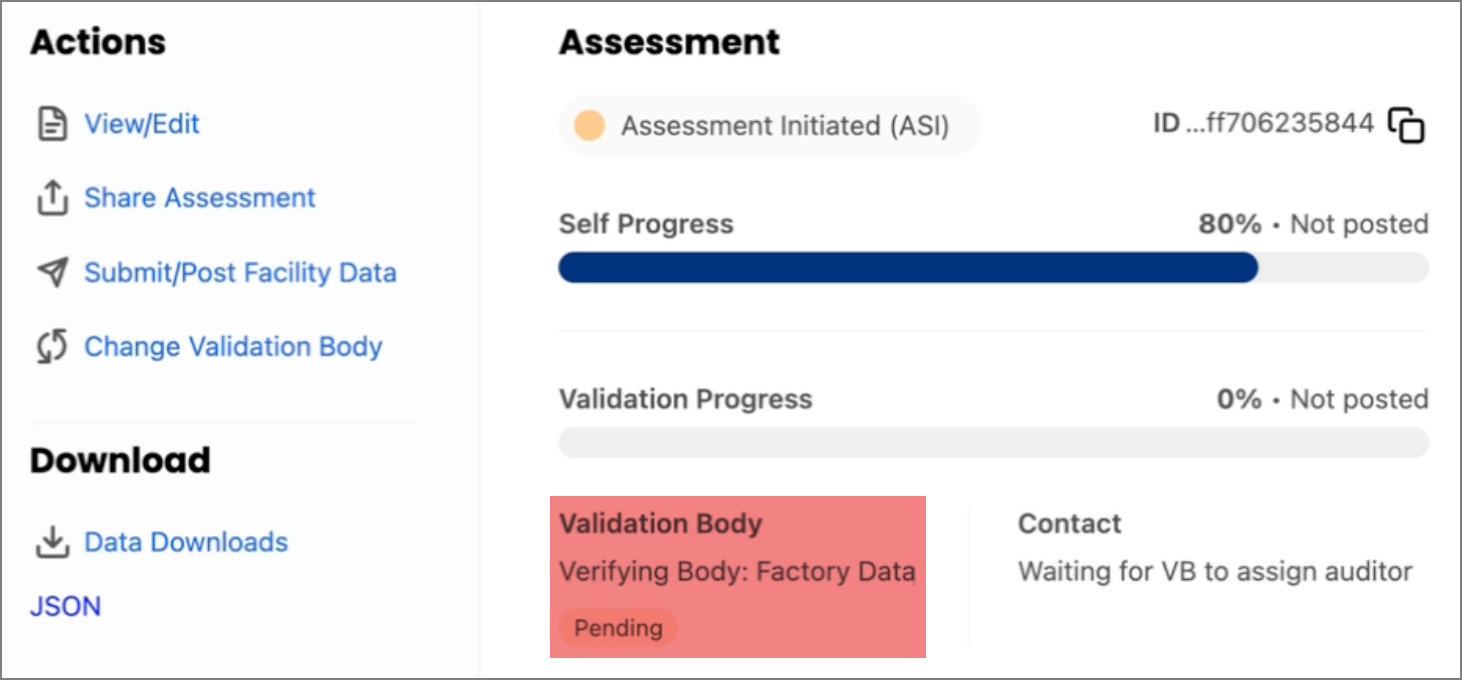
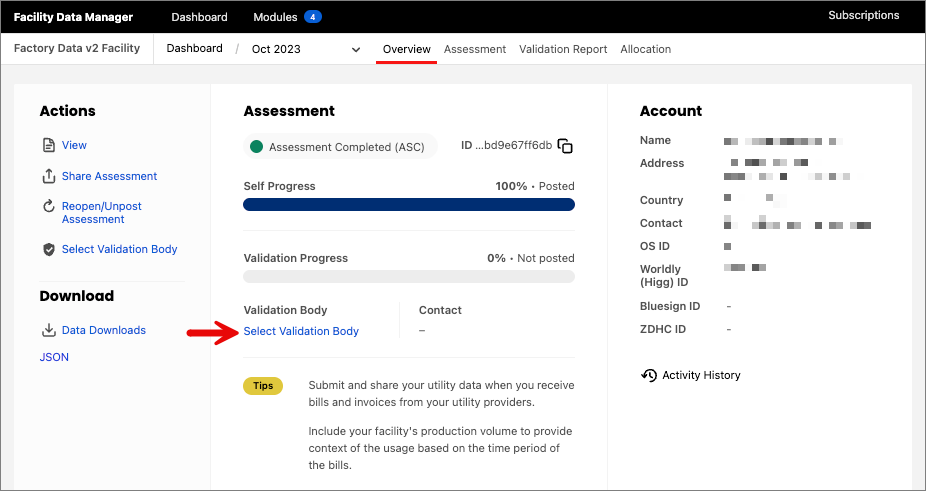
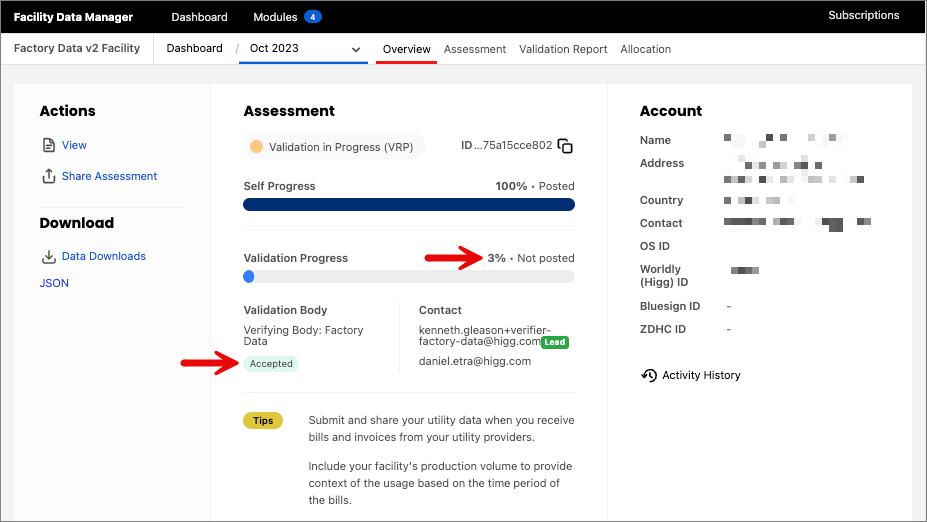
To begin validation, first select the validation body on the platform. This can be done from the FDM dashboard by clicking Select Validation Body. To change the validation body, select Change Validation Body and select a new one from the available options.
The validation provider must then accept the validation request. Once that has been completed, the status will change to Accepted. Click here to learn about rolling forward your Validation Body selection.
The assigned validator will complete the validation process, individually validating the responses to each question in the FDM. Progress towards completion can be monitored using the progress percentage on the FDM dashboard.
Facilities will receive an email once the validation is in progress as well as once it is complete.
Validation Report
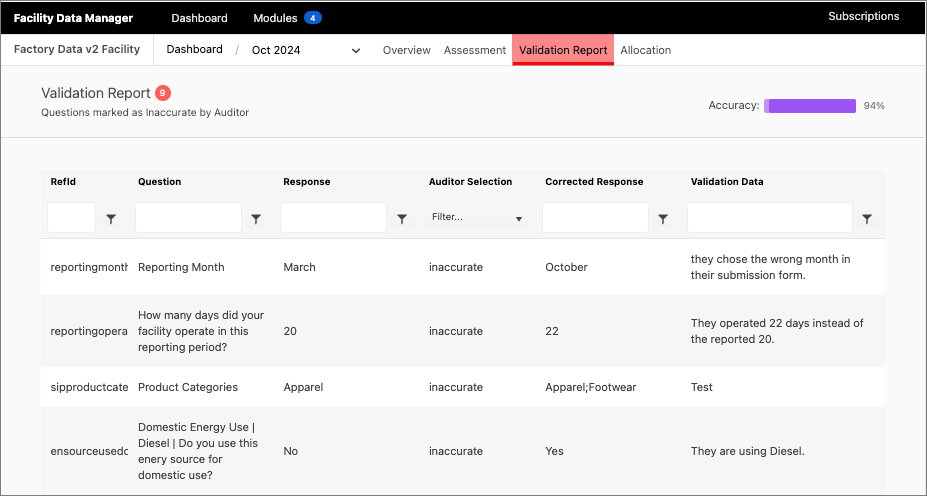
A facility can access the validation report for the completed process by selecting Validation Report on the FDM dashboard. In the below example, you’ll find the number of questions marked incorrect by the FDM validator, along with the overall accuracy percentage displayed at the top. The report includes each question and its REFID, the facility’s response, the auditor’s accuracy selection, the auditor’s corrected response, and any notes the auditor left for that question.
Once complete, facilities will receive a reminder email to review and finalize the validation report. At this point, facilities will have the option to request edits or finalize validation.
If any edits need to be made, facilities will need to contact the auditor off the Worldly platform to discuss those changes. Once a facility has accepted the validation they can click Finalize and Post Module which moves the validation status into VRF.
Conducting Validation as an Approved Validation Body
Please contact vbsubscriptions@worldly.io to inquire about becoming an approved FDM Validation Body.
Receiving Validation Requests
Once a facility has selected a validation body, the validation body will need to accept that validation request and assign an auditor to the module.
Under Modules, go to Validations Received and click Accept Validation. You can locate the FDMs you are validating under My Validations. Once selected, in the Overview page, click Assign Auditor to select the auditor who will be conducting the validation. You can click Change Auditor to assign a different auditor to the module validation.
Validation Process
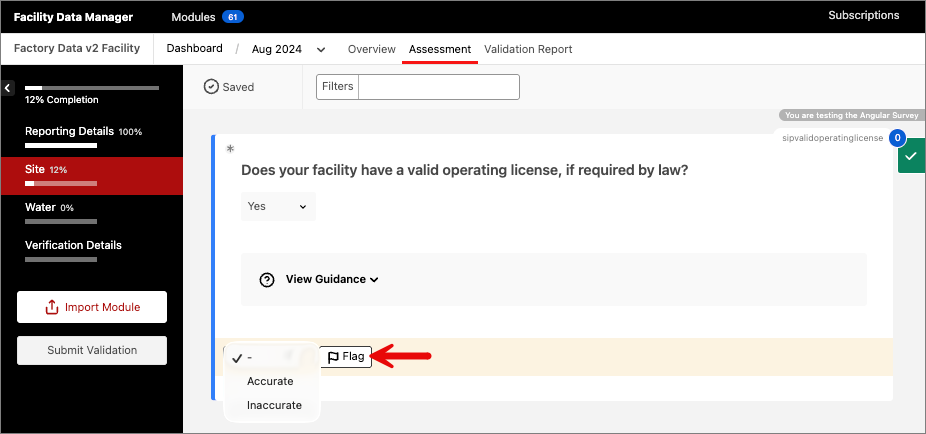
To begin the validation process, the auditor will click Begin Validation from the FDM Overview page. During the assessment, the auditor will review each question, marking it as accurate or inaccurate, with the option to flag specific questions as needed.
Auditors can also add notes to accompany their responses. Any changes made during validation are saved automatically and the filtering tool at the top makes it easy to filter any questions.
In addition to validating the questions in FDM, auditors will need to fill out the Validation Details section such as the Validation Type that was conducted, Validation start and end dates, and total person days.
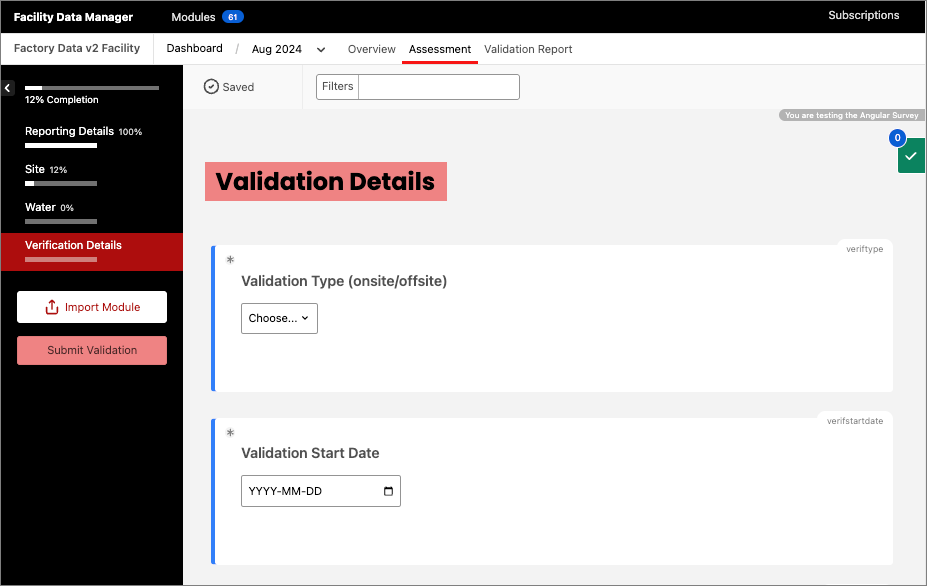
If you need to leave and come back to validation at a later time, you can access where you left off by going to the Overview page and clicking View/Edit to open the assessment again.
Once validation is 100% complete, click Submit and the status will advance to VRC or Validation Complete At this point the facility will be notified of completion and can go through the validation report and choose to request edits with the auditor – or finalize validation.
Once a facility has marked the validation as Finalized the validator will receive a confirmation email.
Rolling Forward Validation Body Selections
If a facility previously entered production allocation, they will be shown the option to roll forward partners from the previous submission.
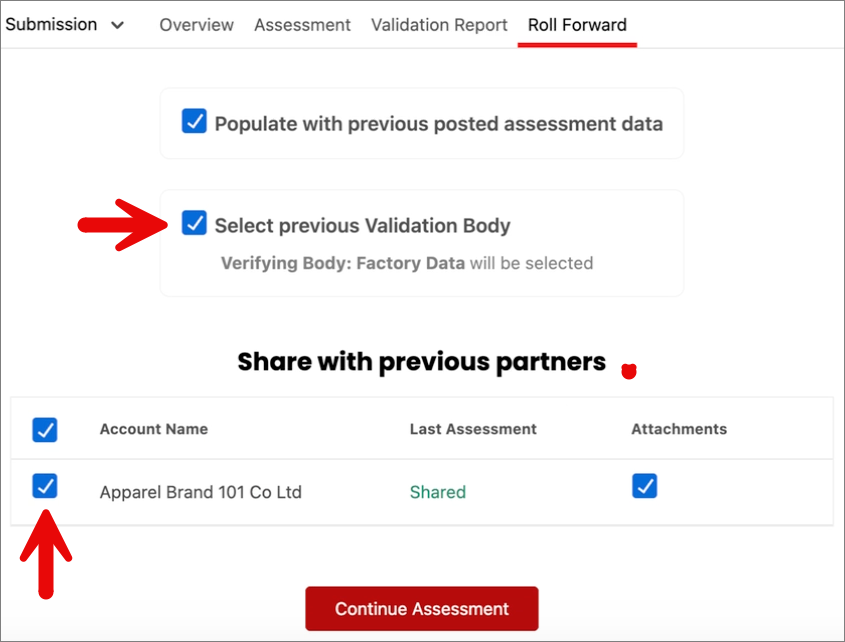
If a facility assigned a VB to a previous submission, the system will pre-select that VB to roll forward. When the facility starts the new submission, the facility will be presented with the option to roll forward the VB assigned to the previous module by way of a check box on the roll forward menu.
If a facility assigns a VB to a module after the module has been posted to ASC status, the roll forward function will not work. Additionally, the facility must manually assign a VB to the new open submission module. The system creates the new module before the facility can select a VB, which makes this manual assignment necessary.
The VB roll forward feature will appear as an option on an open submission only if the VB assigned during the reporting year accepted at least one prior module for validation.